Account Takeover: How Hackers Steal Your Digital Identity
Attackers rarely break your password; they usually bypass it by exploiting the recovery process or your phone number.
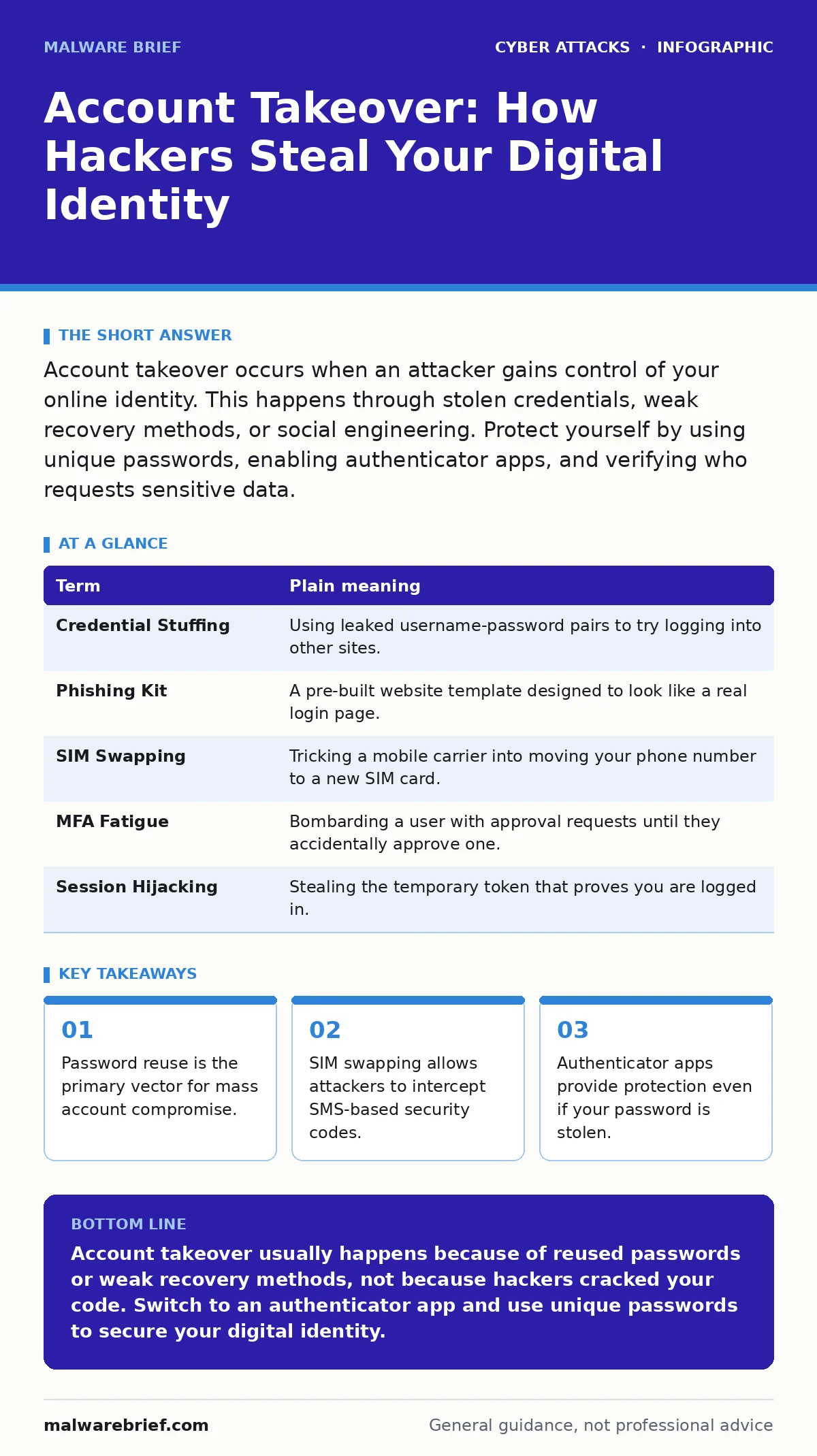
Account takeover occurs when an attacker gains control of your online identity. This happens through stolen credentials, weak recovery methods, or social engineering. Protect yourself by using unique passwords, enabling authenticator apps, and verifying who requests sensitive data.
The House Key Analogy
Imagine your online accounts are houses. You hold the front door key, which is your password. Most people assume that if they keep the key safe, the house is secure. This assumption is flawed because attackers rarely try to pick the lock. Instead, they find ways to get you to hand over the key, or they copy it from another house you own. Sometimes, they simply convince the landlord to give them a new key while you are away. Understanding this dynamic changes how you view security. You are not just guarding a door; you are managing access rights in a system designed for convenience, not defence.
The Mechanics of Entry
Attackers use several methods to gain entry. The most common is credential stuffing, where they use passwords stolen from one breach to try logging into other services. If you reuse passwords, this is highly effective. Another method is phishing, where a fake login page captures your credentials in real time. These pages often mimic the look and feel of legitimate services perfectly. A third method involves identity theft, where the attacker impersonates you to reset your password. They do this by contacting customer support or using automated recovery forms. Each method exploits a different weakness in the standard account recovery process.
The Recovery Trap
The recovery process is often the weakest link in account security. When you forget your password, the system asks for proof of identity. This usually involves a security question, an email address, or a phone number. Attackers research your social media profiles to answer security questions. They may also intercept emails or phone calls to receive reset codes. If they control your email, they control your accounts. This is why email security is foundational. Losing your email account is often the first step to losing all other accounts linked to it. The recovery mechanism is designed for you, but it is vulnerable to anyone who can impersonate you.
Glossary of Terms
| Term | Plain meaning |
|---|---|
| Credential Stuffing | Using leaked username-password pairs to try logging into other sites. |
| Phishing Kit | A pre-built website template designed to look like a real login page. |
| SIM Swapping | Tricking a mobile carrier into moving your phone number to a new SIM card. |
| MFA Fatigue | Bombarding a user with approval requests until they accidentally approve one. |
| Session Hijacking | Stealing the temporary token that proves you are logged in. |
The Cost of Convenience
Convenience often undermines security. Many services allow you to log in with a single click or remember your password on shared devices. This creates persistent access tokens that can be stolen. If an attacker steals this token, they do not need your password. They simply use the token to access your account. This is known as session hijacking. It bypasses standard password protections entirely. Another convenience feature is "remember this device." If your computer is compromised, the attacker inherits this trust. You must balance ease of use with the risk of persistent access.
See also: SIM Swapping Explained: How Attackers Steal Your Identity · Phishing Kits: Definition, Mechanics and Operational Reality
Phone Numbers Are Not Secrets
Using your mobile phone number for two-factor authentication introduces a specific risk. Your phone number is tied to your identity and your carrier account. Attackers can perform SIM swapping to redirect your calls and texts to their device. They do this by impersonating you and convincing the carrier to issue a new SIM card. Once they have your number, they receive your SMS codes. This renders SMS-based two-factor authentication useless. For high-value accounts, SMS is an insecure channel. It relies on the security of the telecommunications network, which is often outside your control.
Simple Safety Habits
You can reduce your risk with three specific habits. First, use a password manager to generate and store unique passwords for every account. This prevents credential stuffing from affecting multiple services. Second, use an authenticator app for two-factor authentication instead of SMS. Apps generate codes locally on your device, so they cannot be intercepted via SIM swapping. Third, review your account recovery settings regularly. Ensure your recovery email and phone number are current and secure. Remove old or unused recovery options. These steps create layers of defence that work even if one layer fails.
Try This Now
- Enable an authenticator app on your most important accounts, such as email and banking.
- Check your password manager for any duplicate passwords and change them immediately.
- Update your account recovery information to ensure it is accurate and secure.
The Human Element
Technology alone cannot prevent account takeover. Attackers often use social engineering to manipulate you. They may pose as IT support or a trusted contact to request your credentials. This is where security culture matters. You must be sceptical of unsolicited requests for sensitive information. Verify the identity of anyone asking for access or confirmation. If a request feels urgent or unusual, pause and verify it through a separate channel. Do not rely on the contact details provided in the message itself. Human judgement is the final line of defence.
Related Threats
Account takeover is often the goal of other attacks. For example, formjacking steals data as you type it, providing attackers with fresh credentials. Zero-click attacks can compromise your device without any interaction, potentially stealing session tokens. Phishing kits are used to create convincing fake login pages to harvest your details. Understanding these related threats helps you see the broader context. They all aim to bypass your defences and gain access to your digital life.
Key takeaways
- Password reuse is the primary vector for mass account compromise.
- SIM swapping allows attackers to intercept SMS-based security codes.
- Authenticator apps provide protection even if your password is stolen.
Account takeover usually happens because of reused passwords or weak recovery methods, not because hackers cracked your code. Switch to an authenticator app and use unique passwords to secure your digital identity.
Frequently asked questions
Is two-factor authentication enough to stop account takeover?
It significantly reduces risk, but it is not foolproof. If the second factor is SMS, it can be bypassed via SIM swapping. Use an authenticator app or hardware key for better protection.
What should I do if I think my account has been taken over?
Immediately change your password and enable two-factor authentication if possible. Review recent activity and revoke any unknown sessions or devices. Contact the service provider to report the breach.
Do I need a password manager?
Yes, it is the most effective tool for managing unique passwords. It ensures you do not reuse credentials, which is the primary cause of mass account compromises.
Can I use my email for two-factor authentication?
It is better than nothing, but it is not ideal. If your email account is compromised, the attacker can reset your other passwords. Use an authenticator app for a more secure second factor.
How this guide was produced: written by the Malware Brief editorial team with AI assistance, checked against the public references listed below, and reviewed when the facts change. See our editorial policy or report an error.