Phishing Kits: Definition, Mechanics and Operational Reality
Phishing kits are pre-packaged criminal toolsets that standardise deception, allowing attackers to bypass security filters by mimicking trusted interfaces with surgical precision.
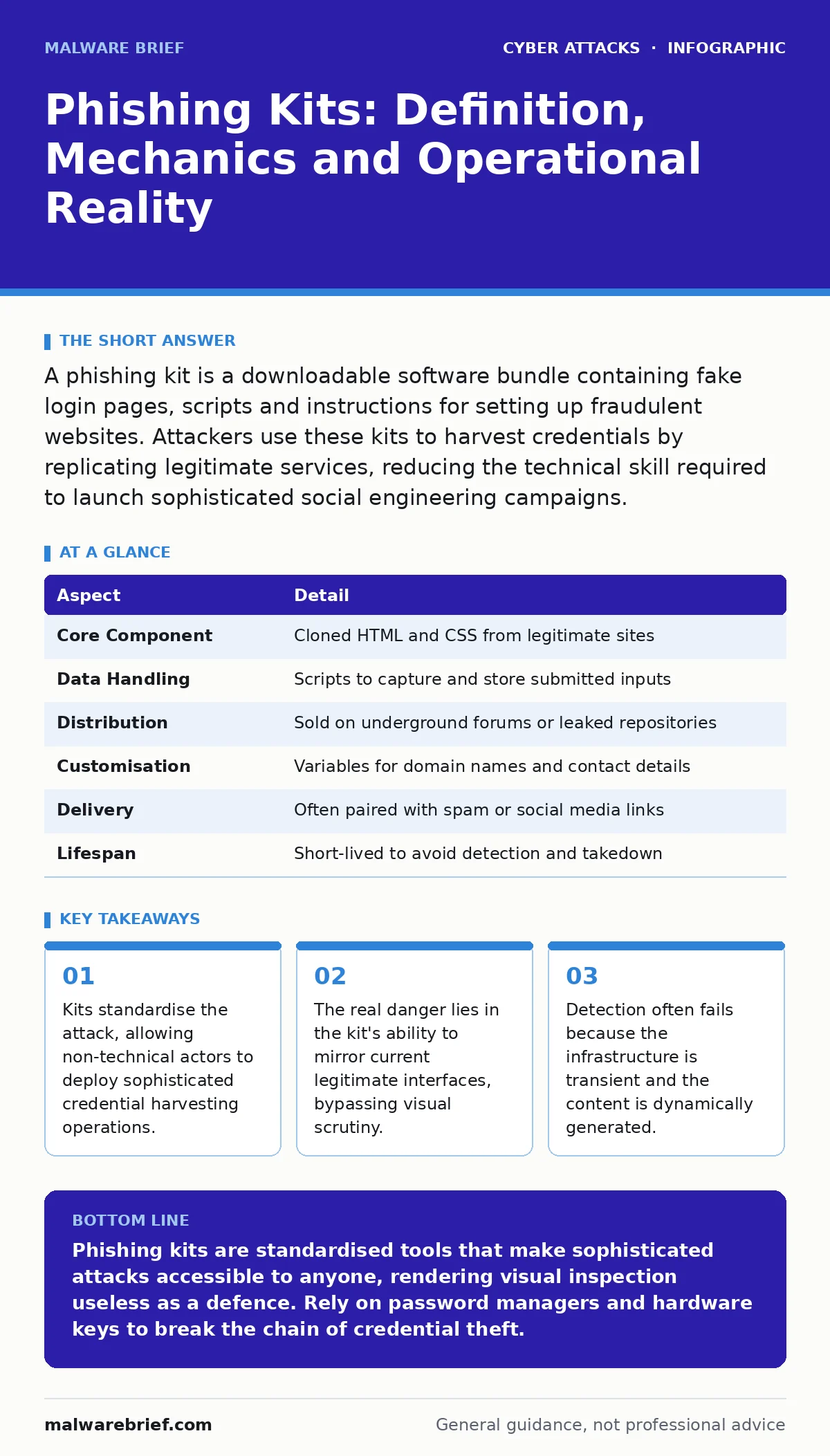
A phishing kit is a downloadable software bundle containing fake login pages, scripts and instructions for setting up fraudulent websites. Attackers use these kits to harvest credentials by replicating legitimate services, reducing the technical skill required to launch sophisticated social engineering campaigns.
The Analogy of the Fake Bank Branch
Imagine a criminal does not build a counterfeit bank from scratch. Instead, they buy a pre-fabricated branch. It has the correct logo, the correct queue barriers and even a teller who speaks the right jargon. The only difference is that the vault is painted on. You hand over your PIN, believing you are securing your assets. The criminal takes the PIN and the cash. The branch vanishes before anyone realises it was never connected to the central banking system.
This is the operational logic of a phishing kit. It removes the need for custom coding. It provides a ready-made facade that looks identical to the real service. The attacker’s job shifts from engineering to logistics.
What Is a Phishing Kit
A phishing kit is a collection of files designed to create a fraudulent website. It typically includes HTML templates, CSS stylesheets and JavaScript files. These files replicate the look and feel of a legitimate service, such as an email provider, a banking portal or a corporate login page.
The kit also contains backend scripts. These scripts capture the data you enter into the fake form. They store this data in a database or send it to an attacker-controlled server. Some kits include instructions on how to host the site and how to set up the email infrastructure to send the initial luring message.
| Aspect | Detail |
|---|---|
| Core Component | Cloned HTML and CSS from legitimate sites |
| Data Handling | Scripts to capture and store submitted inputs |
| Distribution | Sold on underground forums or leaked repositories |
| Customisation | Variables for domain names and contact details |
| Delivery | Often paired with spam or social media links |
| Lifespan | Short-lived to avoid detection and takedown |
Origin and Distribution Channels
These kits originate from the intersection of crime and commerce. Developers create them to profit from the demand for easy-to-use attack tools. They sell access to these kits on hidden forums. The price varies based on the complexity of the cloned site and the sophistication of the backend.
Buyers often have little technical expertise. They rely on the kit’s documentation to set up the attack. The kit provider may offer updates if the legitimate site changes its design. This creates a service model where the attacker pays for maintenance. The goal is to keep the fake site looking current so users do not notice discrepancies.
Daily Operation and Infrastructure
Setting up a phishing campaign using a kit is a process of assembly. The attacker registers a domain name that resembles the target brand. They might use a typo, such as swapping a letter, or add a hyphen. They point this domain to a web server.
The attacker uploads the kit’s files to the server. They configure the backend script to save captured data. They then send emails or messages containing links to the fake site. When you click the link, your browser loads the cloned page. You enter your username and password. The script intercepts this input. It may then redirect you to the real site to avoid suspicion, or it may show a "login failed" error to encourage you to try again.
The Hidden Cost of Standardisation
There is a non-obvious consequence to the use of kits. Because many attackers use the same kit, the attacks look identical. Security researchers can identify the kit by its code structure. They can create signatures that block thousands of sites at once.
However, this also means the kits evolve quickly. Developers patch their kits to avoid these signatures. They change variable names, obfuscate code or alter the HTML structure. This creates an arms race. The standardisation that makes the kit easy to use also makes it easier to detect, forcing constant updates.
Another hidden cost is the false sense of security. You might think that if a site looks wrong, it is fake. But high-quality kits mirror the real site pixel-for-pixel. They include the correct favicons, the correct error messages and the correct legal footers. Visual inspection is no longer a reliable defence.
See also: Hacktivism Explained: Motives, Methods and Technical Realities · Web Shell Removal: Containment, Eradication and Recovery
What People Usually Get Wrong
Many people believe phishing is just about bad spelling or poor grammar. They think they can spot a fake by reading carefully. This is incorrect. Modern kits use professional templates. The text is perfect. The layout is responsive on mobile devices. The deception is technical, not linguistic.
Others believe that if the URL is not exactly right, they are safe. Attackers use homograph attacks. They use characters from other alphabets that look like Latin letters. A domain might look like paypa1.com but use a Cyrillic 'a'. Your browser displays it as normal. You see the familiar brand name. You do not see the subtle difference in the character code.
The Role of Authentication Bypasses
Phishing kits are often combined with other attack methods. The kit harvests the password. But many accounts now use multi-factor authentication. The kit alone cannot bypass this.
Attackers may use the kit to initiate a session. They then trick you into providing the second factor. This is where MFA fatigue attacks come into play. The attacker sends repeated push notifications until you approve one by mistake. Or they use callback verification tricks, where they impersonate support to get you to read out a code.
The kit is the entry point. It provides the initial access. The subsequent steps exploit human psychology or protocol weaknesses. Understanding the kit helps you understand the start of the chain. It is rarely the end.
Defence and Detection
Defending against kits requires a shift in focus. You cannot rely on visual checks. You must rely on technical controls. Use a password manager. It will not auto-fill credentials on a fake site because the domain does not match the saved entry. This is the most effective single defence.
Enable hardware-based security keys. These devices are bound to the specific domain. They will not sign a request from a phishing site. This breaks the chain even if the kit captures your password.
Organisations should use threat intelligence. They can block known kit domains. They can monitor for new registrations that resemble their brand. They should train staff to recognise the pattern of urgency. The kit provides the stage. The script provides the pressure. Recognising the pressure helps you ignore the stage.
Key takeaways
- Kits standardise the attack, allowing non-technical actors to deploy sophisticated credential harvesting operations.
- The real danger lies in the kit's ability to mirror current legitimate interfaces, bypassing visual scrutiny.
- Detection often fails because the infrastructure is transient and the content is dynamically generated.
Phishing kits are standardised tools that make sophisticated attacks accessible to anyone, rendering visual inspection useless as a defence. Rely on password managers and hardware keys to break the chain of credential theft.
Frequently asked questions
How do I know if I have fallen for a phishing kit?
Check your account activity for logins from unknown devices or locations. If you see suspicious activity, change your password immediately and enable multi-factor authentication.
Are phishing kits legal to possess?
Possessing or distributing phishing kits is illegal in most jurisdictions. They are designed for fraud and unauthorised access. Even downloading them for study can carry legal risks.
Can antivirus software detect phishing kits?
Antivirus software can sometimes detect the files if you download them. However, it cannot protect you from clicking a link to a live phishing site. Browser extensions and DNS filtering are more effective.
Why do phishing kits look so realistic?
Kits are built by scraping the actual source code of legitimate websites. They include the latest styles and scripts. They are updated frequently to match any changes the real site makes.
How this guide was produced: written by the Malware Brief editorial team with AI assistance, checked against the public references listed below, and reviewed when the facts change. See our editorial policy or report an error.