DevSecOps Mistakes: 7 Errors Breaking Your Pipeline and Fixes
Treating security as a separate phase creates blind spots that automated tools cannot detect during routine deployment cycles.

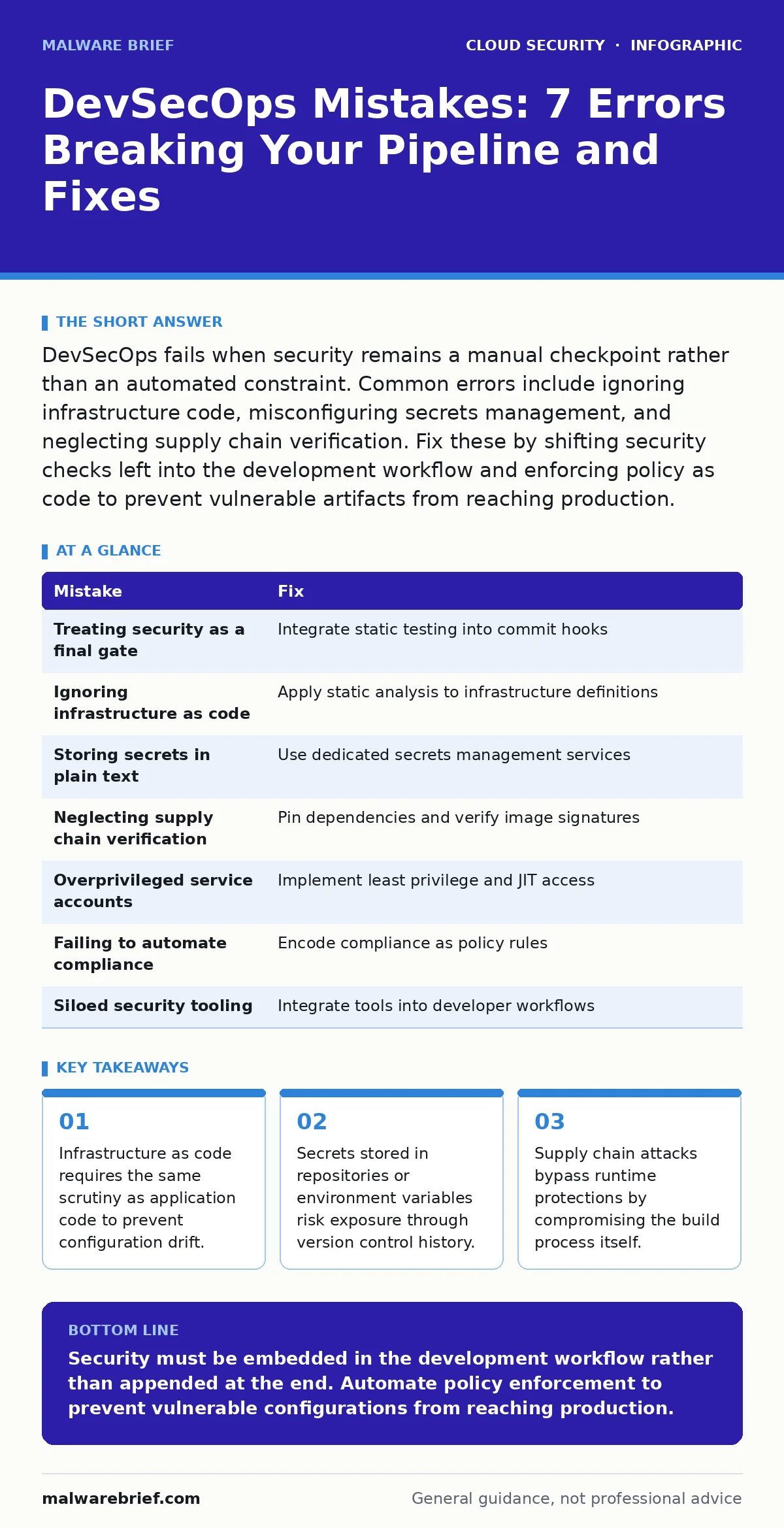
DevSecOps fails when security remains a manual checkpoint rather than an automated constraint. Common errors include ignoring infrastructure code, misconfiguring secrets management, and neglecting supply chain verification. Fix these by shifting security checks left into the development workflow and enforcing policy as code to prevent vulnerable artifacts from reaching production.
Mistake 1: Treating Security as a Final Gate
Developers often view security as a compliance hurdle at the end of the development lifecycle. This approach forces teams to halt deployment when vulnerabilities are found, creating friction and encouraging workarounds. The security function becomes a blocker rather than an enabler.
Why it hurts:
Late detection increases the cost of remediation. Fixing a flaw in production requires emergency patches, potential service downtime, and rollback procedures. The delay between code commit and security review allows vulnerable code to persist in the main branch for days or weeks.
The fix:
Integrate static application security testing into the initial commit hook. This ensures developers receive feedback before merging code. Shift security checks left to treat security as a design constraint rather than a post-build audit.
Mistake 2: Ignoring Infrastructure as Code
Teams frequently secure application code while neglecting the infrastructure definitions that deploy it. Infrastructure as code scripts define network rules, storage permissions, and compute resources. These files are often treated as operational tasks rather than security-critical artefacts.
Why it hurts:
Misconfigured infrastructure exposes services to the internet or grants excessive database access. A secure application running on an insecure network segment remains vulnerable. Configuration drift occurs when manual changes diverge from the defined state, creating undocumented entry points.
The fix:
Apply static analysis tools to infrastructure definitions. Treat Terraform or CloudFormation files with the same rigour as application code. Define policies that reject deployments violating security baselines, such as public access to storage buckets.
Mistake 3: Storing Secrets in Plain Text
Hardcoding API keys, database passwords, or encryption keys in source code is a persistent error. Developers may do this for convenience during local testing and forget to remove them before committing. Version control systems retain history, making deletion ineffective.
Why it hurts:
Exposure of secrets allows attackers to authenticate as legitimate services. This bypasses network perimeter controls and grants direct access to data stores. The compromise often goes unnoticed until data exfiltration occurs, as the attacker uses valid credentials.
The fix:
Use a dedicated secrets management service. Inject secrets at runtime rather than storing them in configuration files. Ensure secret rotation policies are automated to limit the window of exposure if a key is compromised.
Mistake 4: Neglecting Supply Chain Verification
Developers trust third-party libraries and container images without verifying their integrity. The assumption that public repositories are secure is often incorrect. Malicious packages or compromised base images can introduce backdoors into the build process.
Why it hurts:
Supply chain attacks bypass runtime security controls. The vulnerability exists in the binary before it executes. An attacker controls the code execution path, rendering application firewalls and intrusion detection systems ineffective against the initial compromise.
The fix:
Pin dependencies to specific versions and hashes. Use software bill of materials to track all components. Verify the signature of container images and enforce policies that only allow images from trusted registries.
Mistake 5: Overprivileged Service Accounts
Cloud workloads often run with broad permissions to simplify development. Service accounts are granted administrative access to ensure applications function without permission errors. This violates the principle of least privilege.
Why it hurts:
If an attacker compromises a service account, they gain the same broad access. This allows lateral movement across the cloud environment. The impact scales with the number of resources the account can access, potentially leading to full environment takeover.
The fix:
Implement role-based access control with minimal permissions. Use just-in-time access provisioning for administrative tasks. Regularly audit service account usage to identify and remove unnecessary permissions.
See also: Cloud Shared Responsibility Model: Who Fixes What · Cloud Landing Zones: Benefits, Limits and When to Deploy
Mistake 6: Failing to Automate Compliance Checks
Organisations often perform compliance audits manually at regular intervals. This reactive approach assumes the environment remains static between audits. In a dynamic cloud environment, configurations change frequently, making periodic checks obsolete.
Why it hurts:
Compliance gaps exist between audit cycles. A misconfiguration introduced on Monday may not be detected until the next monthly audit. This window of exposure allows attackers to exploit non-compliant states. Manual processes also lack the granularity to track every change.
The fix:
Encode compliance requirements as policy rules. Automate continuous monitoring to detect deviations from the desired state. Trigger remediation workflows automatically when violations are detected.
Mistake 7: Siloed Security Tooling
Security teams often use separate tools from development teams. This creates data silos where security findings are not visible to developers. The lack of integrated feedback loops slows down remediation and reduces ownership of security issues.
Why it hurts:
Developers ignore security findings they cannot see or understand. Security teams become bottlenecked by manual triage. The disconnect leads to duplicate efforts and inconsistent security posture across different projects.
The fix:
Integrate security tools into the developer workflow. Use a unified platform to aggregate findings from multiple sources. Provide actionable feedback directly in the code review interface to facilitate immediate remediation.
| Mistake | Fix |
|---|---|
| Treating security as a final gate | Integrate static testing into commit hooks |
| Ignoring infrastructure as code | Apply static analysis to infrastructure definitions |
| Storing secrets in plain text | Use dedicated secrets management services |
| Neglecting supply chain verification | Pin dependencies and verify image signatures |
| Overprivileged service accounts | Implement least privilege and JIT access |
| Failing to automate compliance | Encode compliance as policy rules |
| Siloed security tooling | Integrate tools into developer workflows |
Key takeaways
- Infrastructure as code requires the same scrutiny as application code to prevent configuration drift.
- Secrets stored in repositories or environment variables risk exposure through version control history.
- Supply chain attacks bypass runtime protections by compromising the build process itself.
Security must be embedded in the development workflow rather than appended at the end. Automate policy enforcement to prevent vulnerable configurations from reaching production.
Frequently asked questions
How do I balance speed and security in DevSecOps?
Automate security checks to provide immediate feedback without delaying deployment. Treat security as a code quality metric rather than a separate process.
What is the first step to implementing DevSecOps?
Start by integrating static code analysis into your continuous integration pipeline. This provides immediate value with minimal disruption to existing workflows.
Can DevSecOps replace traditional security audits?
No, DevSecOps reduces the frequency of manual audits by automating continuous compliance. Traditional audits remain necessary for regulatory validation and independent verification.
How do I handle third-party library vulnerabilities?
Use automated dependency scanning to detect known vulnerabilities. Pin versions to prevent unexpected updates and maintain a software bill of materials for tracking.
How this guide was produced: written by the Malware Brief editorial team with AI assistance, checked against the public references listed below, and reviewed when the facts change. See our editorial policy or report an error.