Fix Overprivileged Cloud Identities: 7 Mistakes and Remedies
Broad access grants create silent attack paths that bypass traditional network defences and persist even after personnel leave the organisation.

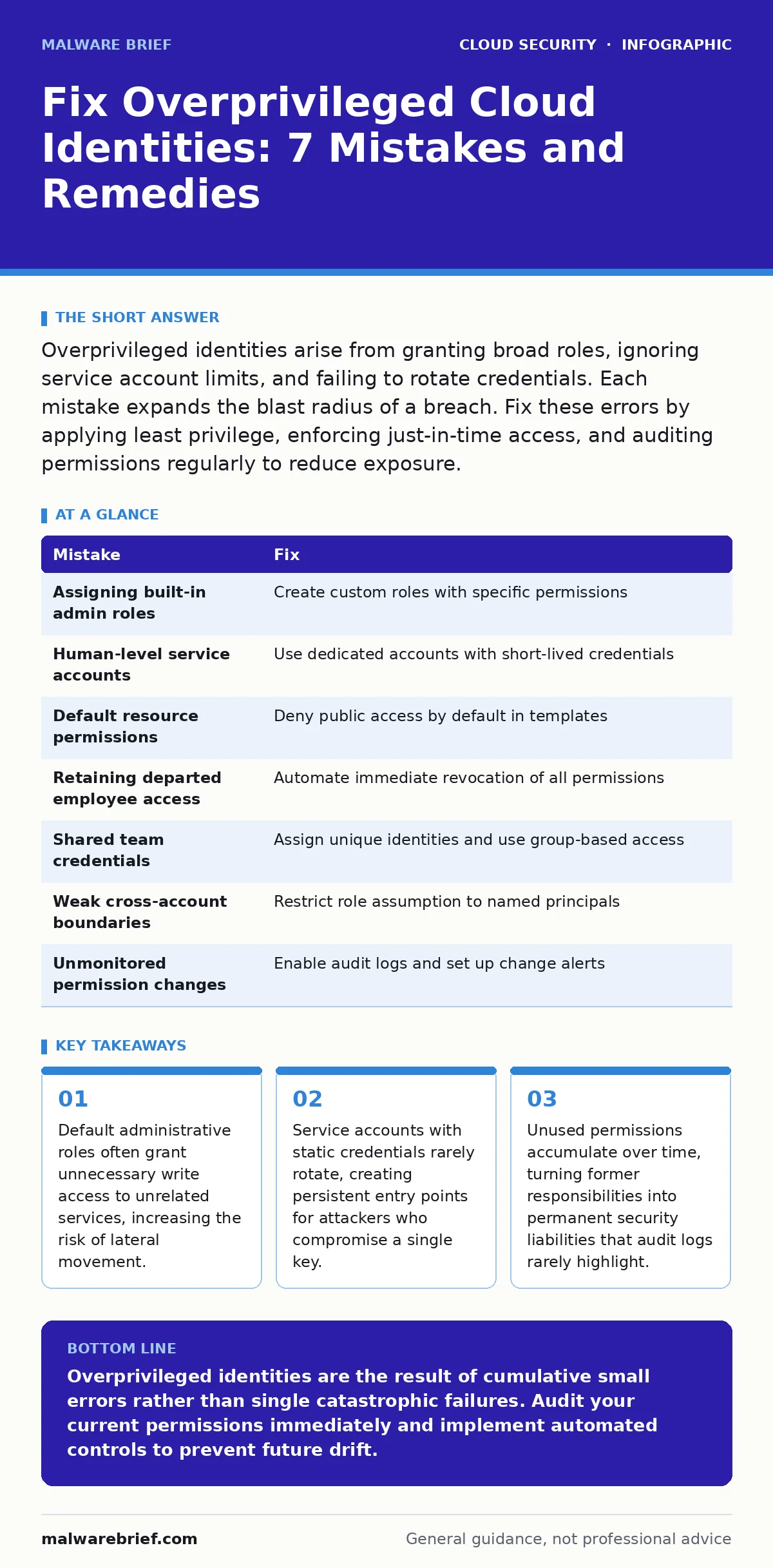
Overprivileged identities arise from granting broad roles, ignoring service account limits, and failing to rotate credentials. Each mistake expands the blast radius of a breach. Fix these errors by applying least privilege, enforcing just-in-time access, and auditing permissions regularly to reduce exposure.
Mistake 1: Assigning Built-in Administrator Roles to Users
Why it hurts: Cloud providers offer pre-built roles such as Administrator or Owner that grant full control over all resources. Assigning these roles to individual users removes the ability to restrict what they can modify. A compromised account with administrator rights allows an attacker to disable logging, create new backdoor accounts, and exfiltrate data from any service. The damage occurs before detection because the activity appears legitimate.
The fix: Delete all built-in administrative roles from human user accounts. Create custom roles that grant only the specific permissions required for a job function. For example, a developer might need read access to storage buckets but no permission to modify network security groups. Review these custom roles quarterly to ensure they still match current job responsibilities. This approach limits the blast radius of any single credential compromise.
Mistake 2: Granting Service Accounts Human-Level Access
Why it hurts: Service accounts are identities used by applications or scripts to interact with cloud services. Treating them like human users means assigning broad, persistent permissions. Unlike humans, service accounts do not log out, do not change passwords, and often run with elevated privileges to automate complex tasks. If an attacker gains access to a service account’s credentials, they inherit all those broad permissions without triggering multi-factor authentication prompts.
The fix: Create dedicated service accounts with the minimum permissions needed for the specific application. Bind these accounts to specific resource groups or projects rather than granting account-wide access. Implement short-lived credentials where possible, such as using workload identity federation. This ensures that if a credential is stolen, it expires quickly and cannot be used to pivot to other services. Refer to identity as the new perimeter for broader strategies on securing these non-human identities.
Mistake 3: Leaving Default Permissions on New Resources
Why it hurts: When you create new cloud resources, such as virtual machines or storage containers, they often inherit default permissions from the parent project or account. These defaults frequently include public read access or broad internal network access. Attackers scan for these misconfigured resources because they provide an easy entry point. A publicly accessible storage bucket can lead to cloud data exfiltration without any need for brute-forcing passwords or exploiting software vulnerabilities.
The fix: Establish a policy that denies public access by default for all new resources. Use infrastructure as code templates that explicitly define restrictive access control lists. Test these templates in a staging environment before deploying to production. Regularly scan your environment for resources that deviate from these secure defaults. This proactive approach prevents accidental exposure that often occurs during rapid development cycles.
Mistake 4: Failing to Remove Access for Departed Employees
Why it hurts: When employees leave, their access is often disabled but not removed. Disabled accounts may still retain permissions that can be reactivated or exploited if the account is compromised. Over time, these dormant accounts accumulate privileges from past projects, creating a hidden pool of overprivileged identities. Attackers target these accounts because they are less likely to be monitored and often have broader historical access than active users.
The fix: Automate the offboarding process to immediately revoke all permissions when an employee’s contract ends. Integrate your identity provider with your cloud platform to ensure real-time synchronization. Conduct regular access reviews to identify and remove permissions for inactive accounts. This eliminates the risk of dormant accounts being used as a foothold for further intrusion. See cloud compliance for frameworks that mandate regular access certification.
Mistake 5: Using Shared Credentials for Teams
Why it hurts: Sharing a single set of credentials among a team makes it impossible to attribute actions to specific individuals. If the credentials are compromised, you cannot determine who acted maliciously or who was targeted. Furthermore, rotating these credentials disrupts the entire team, leading to a reluctance to change them frequently. This creates a persistent security risk where a single leaked password grants access to multiple users’ responsibilities.
The fix: Assign unique identities to every team member. Use group-based access control to manage permissions for teams rather than shared accounts. This allows you to revoke access for a specific individual without affecting others. It also enables precise audit trails, linking every action to a specific user. This granularity is critical for forensic investigations and maintaining accountability within your security operations.
See also: Cloud Shared Responsibility Model: Who Fixes What · Cloud Landing Zones: Benefits, Limits and When to Deploy
Mistake 6: Ignoring Cross-Account Permission Boundaries
Why it hurts: Organisations often use multiple cloud accounts for isolation between development, testing, and production environments. Permissions that allow one account to manage resources in another can create unintended access paths. If a low-privilege account in a development environment gains the ability to assume a role in the production account, it bypasses the intended isolation. This mistake effectively merges the security boundaries of separate environments.
The fix: Define strict trust relationships between accounts. Limit the ability to assume roles to specific, named principals rather than broad account IDs. Implement permission boundaries that cap the maximum privileges a role can attain, even if the role policy grants more. Regularly review these cross-account permissions to ensure they align with your security architecture. This prevents lateral movement between isolated environments.
Mistake 7: Not Monitoring Permission Changes
Why it hurts: Permissions are not static. New roles are created, existing ones are modified, and resources are reorganised. Without monitoring, these changes can gradually increase the privilege level of certain identities. An attacker who gains limited access can slowly escalate their privileges by modifying roles or adding themselves to groups. If you do not track these changes, you will not notice the escalation until significant damage has occurred.
The fix: Enable detailed cloud audit logs for all identity and access management events. Set up alerts for changes to administrative roles or the creation of new users with broad permissions. Use automated tools to detect anomalies in permission usage patterns. This visibility allows you to respond quickly to suspicious activity and maintains a clear record of who changed what and when. Refer to DevSecOps for integrating these checks into your development pipeline.
| Mistake | Fix |
|---|---|
| Assigning built-in admin roles | Create custom roles with specific permissions |
| Human-level service accounts | Use dedicated accounts with short-lived credentials |
| Default resource permissions | Deny public access by default in templates |
| Retaining departed employee access | Automate immediate revocation of all permissions |
| Shared team credentials | Assign unique identities and use group-based access |
| Weak cross-account boundaries | Restrict role assumption to named principals |
| Unmonitored permission changes | Enable audit logs and set up change alerts |
Key takeaways
- Default administrative roles often grant unnecessary write access to unrelated services, increasing the risk of lateral movement.
- Service accounts with static credentials rarely rotate, creating persistent entry points for attackers who compromise a single key.
- Unused permissions accumulate over time, turning former responsibilities into permanent security liabilities that audit logs rarely highlight.
Overprivileged identities are the result of cumulative small errors rather than single catastrophic failures. Audit your current permissions immediately and implement automated controls to prevent future drift.
Frequently asked questions
How do I find overprivileged accounts in my cloud environment?
Use cloud-native identity management tools to list all users and their assigned roles. Compare these roles against the principle of least privilege to identify accounts with excessive permissions.
Can I use multi-factor authentication to fix overprivileged identities?
Multi-factor authentication protects credentials but does not reduce excessive permissions. An attacker with valid MFA and broad roles can still cause significant damage. You must reduce the permissions themselves.
What is the difference between a role and a policy?
A role is an identity that can be assumed by users or services. A policy defines the specific permissions granted to that identity. Roles bind policies to identities, allowing flexible access management.
How often should I review cloud permissions?
Review permissions at least quarterly or whenever there is a significant change in personnel or application architecture. Automated continuous monitoring is preferable to periodic manual reviews.
How this guide was produced: written by the Malware Brief editorial team with AI assistance, checked against the public references listed below, and reviewed when the facts change. See our editorial policy or report an error.