SaaS Account Takeover: Risks and Protection for Small Businesses
Small businesses face SaaS account takeover not because of weak passwords alone, but because default cloud permissions allow attackers to persist after initial entry.

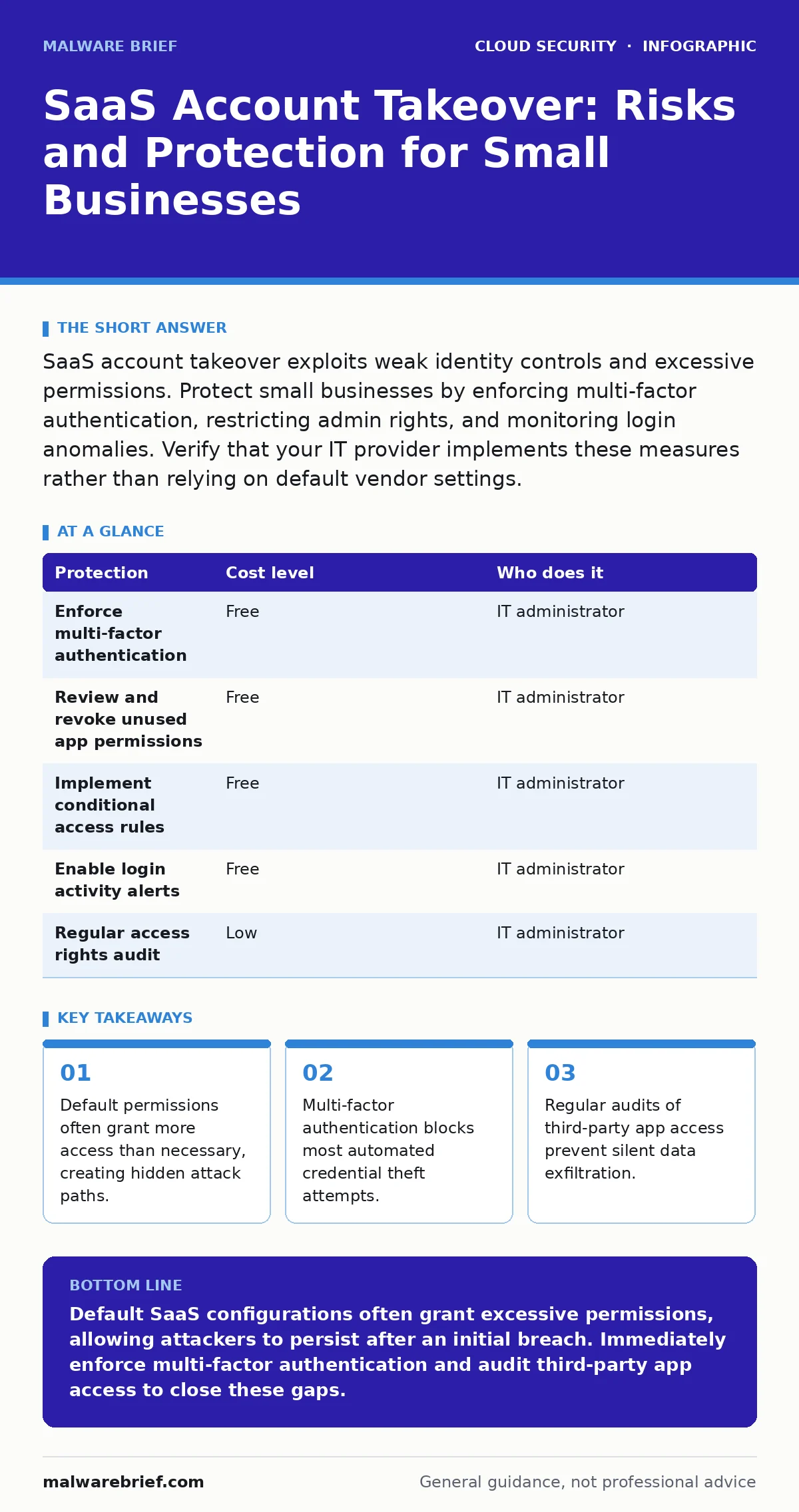
SaaS account takeover exploits weak identity controls and excessive permissions. Protect small businesses by enforcing multi-factor authentication, restricting admin rights, and monitoring login anomalies. Verify that your IT provider implements these measures rather than relying on default vendor settings.
Why Small Organisations Are Exposed to Takeover
Small organisations face disproportionate risk from SaaS account takeover because they lack dedicated security staff and often rely on default configurations. Vendors design their platforms for ease of use, not security. This design choice means that new accounts often come with broad permissions. An administrator can grant access to any feature without understanding the implications.
The concept of identity as the new perimeter explains this shift. Traditional networks used firewalls to keep intruders out. Cloud services move the boundary to the user’s credentials. If an attacker obtains valid login details, they bypass traditional network defences entirely. Small teams rarely segment their identities. One compromised account often grants access to the entire digital workspace.
Another factor is the speed of onboarding. When a new staff member joins, IT staff often copy an existing user’s permissions to save time. This practice, known as role cloning, propagates excessive privileges. If the original user had unnecessary access, the new user inherits it. Over time, the organisation accumulates a large number of high-privilege accounts. Each account represents a potential entry point for an attacker.
The Mechanics of Account Persistence
Attackers do not always seek immediate data theft. They often aim for persistence, which is the ability to maintain access after the initial breach is discovered. SaaS platforms provide features that facilitate this persistence. These features include API keys, service accounts, and application integrations.
An API allows software applications to communicate with each other. Attackers can generate API tokens that act like passwords. These tokens often do not require multi-factor authentication to use. Once an attacker creates a token, they can access data even if the victim changes their password. The token remains valid until it expires or is explicitly revoked.
Service accounts are another vector. These are non-human identities used by automated processes. Small businesses often create service accounts for backup tools or reporting scripts. These accounts are rarely monitored for unusual activity. An attacker can modify the service account’s permissions to access sensitive data. The activity appears legitimate because it comes from a known system identity.
Low-Cost Protections for Limited Budgets
Implementing strong security does not require expensive software. Many effective controls are built into the SaaS platforms themselves. The challenge lies in configuring them correctly. Small businesses can achieve significant risk reduction by focusing on identity management and access control.
Multi-factor authentication is the single most effective control. It requires users to provide two forms of verification. One form is something they know, such as a password. The second form is something they have, such as a mobile device or hardware token. This measure prevents attackers from accessing accounts even if they steal passwords. It blocks the majority of automated credential stuffing attacks.
Conditional access policies add another layer of defence. These policies evaluate the context of a login attempt. They consider factors such as location, device type, and risk level. For example, a policy can block logins from countries where the business has no operations. It can also require additional verification for logins from new devices. This reduces the risk of lateral movement within the account.
| Protection | Cost level | Who does it |
|---|---|---|
| Enforce multi-factor authentication | Free | IT administrator |
| Review and revoke unused app permissions | Free | IT administrator |
| Implement conditional access rules | Free | IT administrator |
| Enable login activity alerts | Free | IT administrator |
| Regular access rights audit | Low | IT administrator |
Managing Third-Party Application Risks
SaaS platforms allow users to connect third-party applications. These integrations expand functionality but also expand the attack surface. Each connected app receives a certain level of access to the main account. Users often grant these permissions without reading the details.
An attacker can exploit this by installing a malicious application. The app appears legitimate but requests broad permissions. Once installed, it can read emails, contacts, and files. The user may not notice the installation because the app blends in with other tools. Regular audits of connected applications are necessary to identify and remove risky integrations.
Small businesses should establish a policy for approving new applications. Only authorised staff should install integrations. The IT team should review the permissions requested by each app. If an app requires more access than necessary, it should be rejected. This practice limits the damage if an app is compromised or turns malicious.
What to Ask Your IT Provider
If you outsource your IT management, you must verify that security is part of the service. Many providers focus on keeping systems running rather than securing them. You need to ask specific questions to ensure your SaaS environments are protected.
Ask about their process for managing user permissions. They should have a documented method for granting and revoking access. This process should include regular reviews to ensure users only have the permissions they need. Ask how they handle offboarding. When an employee leaves, their access should be revoked immediately. Delayed revocation leaves accounts active and vulnerable.
Ask about their monitoring capabilities. They should be able to detect unusual login activity. This includes logins from new locations or at unusual times. They should have a plan for responding to alerts. Ask if they provide regular reports on security posture. These reports should highlight any gaps in configuration or policy.
- How do you enforce multi-factor authentication for all users?
- What is your process for reviewing and revoking third-party app permissions?
- How do you monitor for suspicious login activity?
- What is your response time for revoking access when an employee leaves?
- Do you provide regular security configuration audits?
See also: Fix Overprivileged Cloud Identities: 7 Mistakes and Remedies · Cloud API Insecurity Myths: What You Get Wrong About Interface Risks
The Hidden Cost of Default Configurations
Vendors ship their products with default settings that prioritise usability. These settings often leave significant security gaps. For example, many platforms allow password resets via email without additional verification. Attackers can exploit this by intercepting reset emails or guessing security questions.
Another common default is the sharing of files and folders. Many platforms allow users to share content with anyone who has the link. This setting can lead to accidental data exposure. Attackers can use these shared links to access sensitive information. Changing these defaults requires manual effort. Small businesses often neglect this step, leaving their data vulnerable.
The shared responsibility model clarifies that security is a joint effort. The vendor secures the infrastructure. The customer secures the data and access. Small businesses often misunderstand this division. They assume the vendor handles all security. This misconception leads to negligence in configuring access controls and monitoring.
Addressing Cloud Logging Gaps
Effective security requires visibility into account activity. Most SaaS platforms provide logs of user actions. However, these logs are often difficult to interpret. Small businesses rarely have the tools or expertise to analyse them. This creates cloud logging gaps where malicious activity goes unnoticed.
Attackers know this. They often operate during periods of low activity to avoid detection. They may also delete their own logs to cover their tracks. If the platform does not retain logs securely, this deletion is permanent. Small businesses should enable log forwarding to a secure storage location. This ensures that logs are preserved even if the attacker gains control of the account.
Regular review of logs is essential. Look for patterns of unusual behaviour. Multiple failed login attempts, logins from new devices, and large data downloads are red flags. Establishing a baseline of normal activity helps identify anomalies. This process requires time and attention. It is often overlooked in small organisations.
Building a Resilient Identity Framework
Protecting against SaaS account takeover requires a holistic approach. You must combine technical controls with organisational practices. Technical controls include multi-factor authentication, conditional access, and least privilege. Organisational practices include regular training, clear policies, and incident response planning.
Small businesses should treat identity as a critical asset. Invest in tools and processes that protect it. Regularly review and update your security posture. Stay informed about new threats and vulnerabilities. Engage with your IT provider to ensure they are up to date. By taking these steps, you can significantly reduce the risk of account takeover.
Key takeaways
- Default permissions often grant more access than necessary, creating hidden attack paths.
- Multi-factor authentication blocks most automated credential theft attempts.
- Regular audits of third-party app access prevent silent data exfiltration.
Default SaaS configurations often grant excessive permissions, allowing attackers to persist after an initial breach. Immediately enforce multi-factor authentication and audit third-party app access to close these gaps.
Frequently asked questions
Does multi-factor authentication stop all account takeovers?
Multi-factor authentication stops most credential theft but does not protect against social engineering where an attacker tricks the user into authorising a login.
How often should we review user permissions?
Review permissions quarterly or whenever an employee changes roles or leaves the organisation to ensure access remains appropriate.
What is the biggest risk for small businesses?
The biggest risk is relying on default vendor settings which prioritise ease of use over security, leaving accounts exposed to easy exploitation.
Can an IT provider guarantee security?
No provider can guarantee complete security, but they should implement standard controls and provide regular monitoring and audit reports.
How this guide was produced: written by the Malware Brief editorial team with AI assistance, checked against the public references listed below, and reviewed when the facts change. See our editorial policy or report an error.