Backported Security Fixes: How They Work and Why They Matter
Backported fixes change only the vulnerable code paths, keeping the rest of the software unchanged to prevent breaking existing systems.
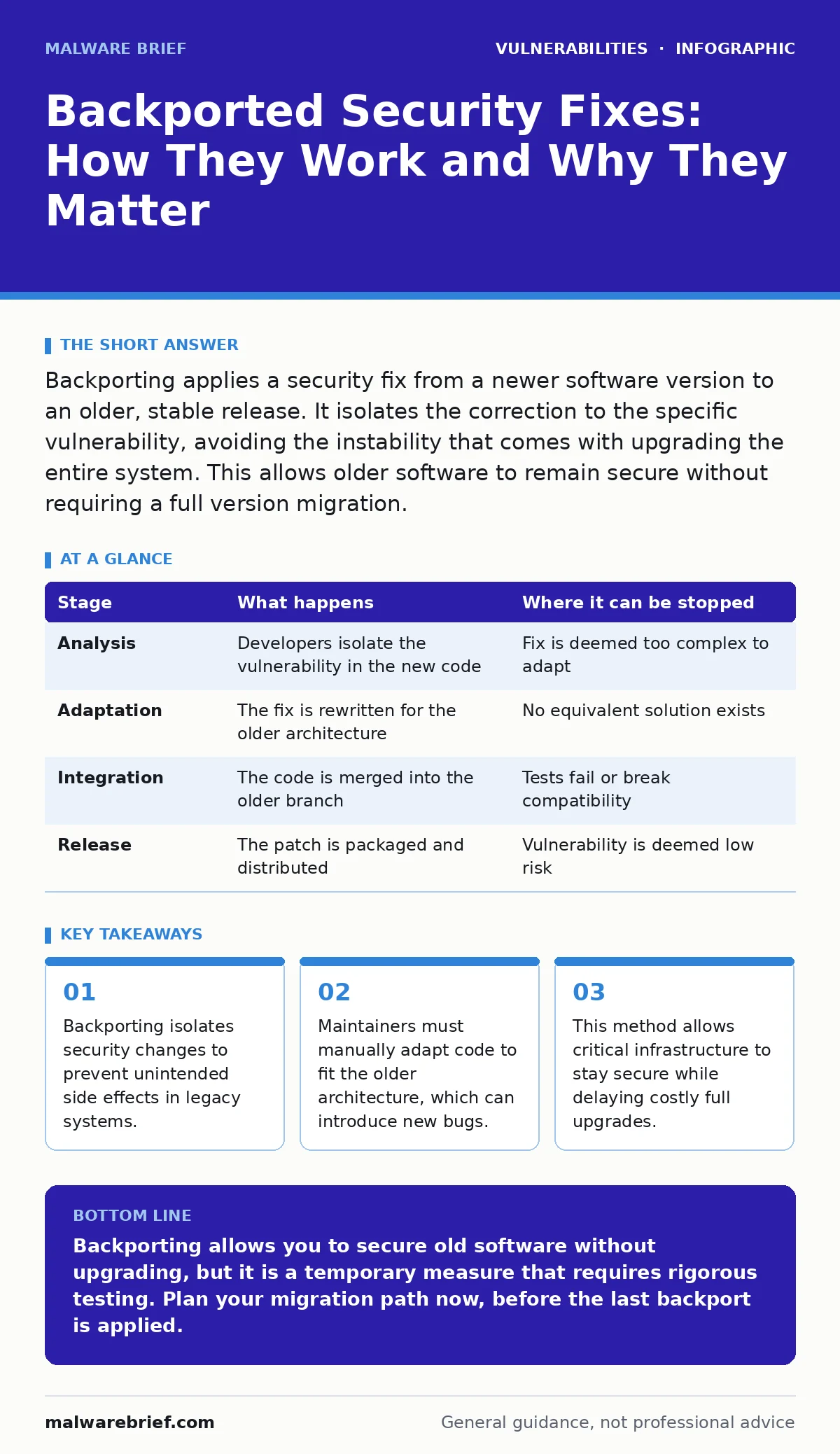
Backporting applies a security fix from a newer software version to an older, stable release. It isolates the correction to the specific vulnerability, avoiding the instability that comes with upgrading the entire system. This allows older software to remain secure without requiring a full version migration.
The Case for Selective Updates
Software evolves rapidly. New versions bring features, but they also change underlying structures. For many organisations, upgrading to the latest version is not feasible. It may break compatibility with legacy hardware or require extensive re-testing. Yet, leaving old software unpatched invites exploitation.
Backporting solves this tension. It takes a specific security fix from a newer version and applies it to an older, stable release. The goal is to close the vulnerability without touching the rest of the codebase. This preserves the stability of the older version while addressing the immediate risk.
This approach differs from a standard patch. A standard patch might update multiple components together. A backport is surgical. It changes only what is necessary to stop the attack. This precision is vital for systems that cannot tolerate change.
Stage 1: Identifying the Root Cause
The process begins when a vulnerability is discovered in the latest version of the software. Developers analyse the issue to understand exactly why it occurs. They must distinguish between the symptom and the root cause.
If the fix relies on a new library or a changed data structure, it cannot be backported directly. The maintainer must find an equivalent solution that works within the constraints of the older code. This often requires rewriting the fix entirely.
Suppose a new version fixes a buffer overflow by changing how memory is allocated. The older version uses a different memory manager. The maintainer must adapt the logic to fit the old manager without introducing new leaks.
| Stage | What happens | Where it can be stopped |
|---|---|---|
| Analysis | Developers isolate the vulnerability in the new code | Fix is deemed too complex to adapt |
| Adaptation | The fix is rewritten for the older architecture | No equivalent solution exists |
| Integration | The code is merged into the older branch | Tests fail or break compatibility |
| Release | The patch is packaged and distributed | Vulnerability is deemed low risk |
Stage 2: Adapting the Code
Writing the backport is the most difficult stage. The maintainer must understand both the new fix and the old codebase. They write new code that achieves the same security outcome but uses the older tools.
This is not a copy-paste operation. It requires deep knowledge of the software’s history. The maintainer must ensure the new code does not conflict with other parts of the old system. Any conflict can cause crashes or data corruption.
This stage often reveals hidden dependencies. Code that seemed independent in the new version may rely on implicit behaviours in the old version. The maintainer must account for these differences.
Stage 3: Testing for Regression
Once the code is written, it must be tested. The primary goal is to ensure the vulnerability is fixed. The secondary, and often harder, goal is to ensure nothing else breaks. This is called regression testing.
Testers run the old software with the new patch. They check for crashes, performance drops, or unexpected errors. They also verify that the original functionality remains intact. If the patch breaks a core feature, it cannot be released.
This testing is more rigorous than for new features. A new feature can be optional. A backport must be invisible to the user. It must fix the security hole without changing how the software feels or behaves.
Stage 4: Distribution and Application
After testing, the patch is packaged for distribution. Users apply it through their package manager or update tool. The process looks like a normal update, but the scope is narrower.
Users should verify the patch notes. These notes describe exactly what was changed. This transparency helps administrators assess the risk. If the notes are vague, the patch may be poorly tested.
See also: How XML External Entity Attacks Work and Where They Fail · Patch Management: Eight Questions Answered for Stability
Reading the Patch Details
To understand a backport, you must look at the diff. This shows the lines of code added, removed or changed. Compare this to the original fix in the new version.
Look for similarities in logic, not syntax. The variable names may differ, but the control flow should be similar. If the backport adds complex new logic, it may be over-engineered. Simple fixes are easier to audit.
Check for related changes. A good backport touches only the vulnerable module. If it changes unrelated files, it may be bundling other fixes. This increases the risk of instability.
The Hidden Costs of Backporting
Backporting is not free. It requires skilled developers to spend time adapting code. This time could be spent on new features or other security work. For open-source projects, this labour is often unpaid.
There is also a risk of divergence. As more backports are applied, the old version drifts further from the new one. Eventually, the gap becomes too large to bridge. The old version becomes unmaintainable.
This creates a false sense of security. Users may believe their old software is safe because it is patched. However, the underlying architecture may be obsolete. It may lack modern security features that cannot be backported.
When Backporting Fails
Not every vulnerability can be backported. Some fixes require changes to the core architecture. If the old version lacks the necessary foundations, the fix cannot be applied.
In these cases, the only option is to upgrade. This is where patch management becomes critical. You must have a plan for when backporting is no longer possible. Delaying the inevitable upgrade increases risk.
Sometimes, a backport introduces a new vulnerability. If the adapted code is flawed, it may create a new attack surface. This is why patch testing is non-negotiable. You must test the backport in a staging environment before applying it to production.
Managing the Lifecycle
Backporting extends the life of old software. It does not preserve it forever. You must track which versions are still receiving backports. When a version stops receiving them, it is effectively end-of-life software.
At this point, you must migrate. Continuing to use unsupported software is a significant risk. Attackers target known vulnerabilities in old systems. They know no fixes are coming.
Use software composition analysis to identify what software you are running. This helps you understand which components are vulnerable and which can be backported. Without this visibility, you are guessing.
Beyond Code Fixes
Backporting addresses code-level vulnerabilities. It does not fix configuration errors or usage mistakes. You still need mitigations and workarounds for risks that code cannot solve.
For example, a backport may fix a buffer overflow. It will not stop an attacker from exploiting a weak password policy. You must combine technical fixes with operational controls.
Regular secure code review practices help prevent vulnerabilities in the first place. If the new code is secure, the backport is simpler. If the new code is messy, the backport is difficult and risky.
Dependency and External Risks
Modern software relies on many external libraries. A backport may fix the main application, but not its dependencies. You must also manage dependency updates separately.
A vulnerability in a library may not be backported if the library is no longer maintained. In this case, you must replace the library. This can be difficult if the application is tightly coupled to it.
Be aware of XML external entity (XXE) attacks. These often target how software processes external data. Backports may fix the parser, but you must also ensure your configuration disables external entity resolution.
Key takeaways
- Backporting isolates security changes to prevent unintended side effects in legacy systems.
- Maintainers must manually adapt code to fit the older architecture, which can introduce new bugs.
- This method allows critical infrastructure to stay secure while delaying costly full upgrades.
Backporting allows you to secure old software without upgrading, but it is a temporary measure that requires rigorous testing. Plan your migration path now, before the last backport is applied.
Frequently asked questions
Can backports introduce new bugs?
Yes. Adapting code to an older environment can create unintended interactions. Thorough testing is required to catch these regressions before deployment.
How do I know if a backport is safe?
Review the patch notes and the code changes. Simple, focused changes are safer. If the backport touches many files, it carries higher risk.
Is backporting better than upgrading?
It is safer for stability, but worse for long-term security. Upgrading provides the latest security features. Backporting only fixes specific holes.
What happens when backporting stops?
The software becomes unsupported. You must upgrade or replace it. Continuing to use it exposes you to unpatched vulnerabilities.
How this guide was produced: written by the Malware Brief editorial team with AI assistance, checked against the public references listed below, and reviewed when the facts change. See our editorial policy or report an error.