Defense in Depth for Small Teams: A Practical Layered Security Approach
Small businesses survive cyber attacks by stacking cheap, automated controls that stop threats before human error or technical failure compromises critical data.

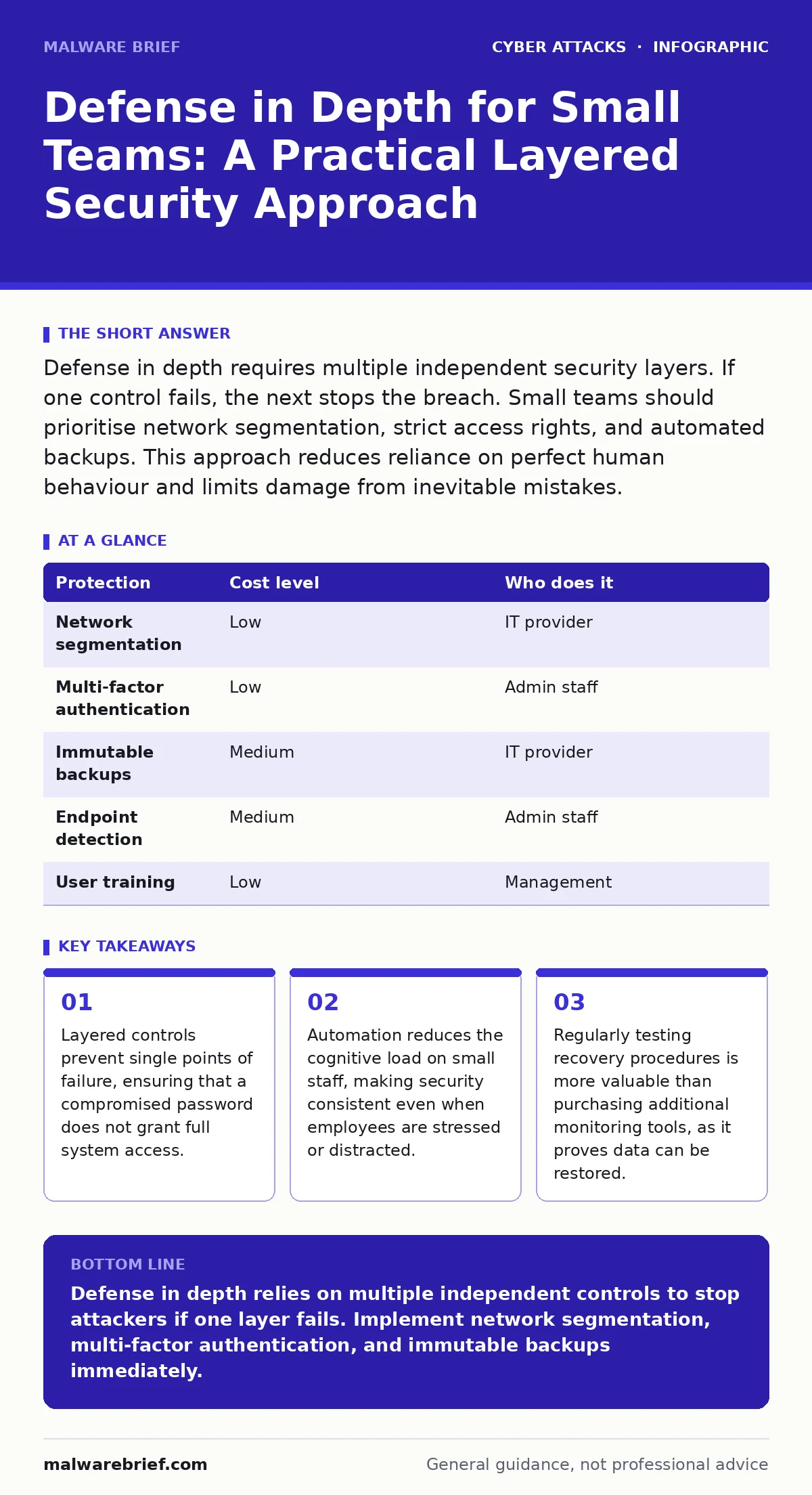
Defense in depth requires multiple independent security layers. If one control fails, the next stops the breach. Small teams should prioritise network segmentation, strict access rights, and automated backups. This approach reduces reliance on perfect human behaviour and limits damage from inevitable mistakes.
Why Layered Security Matters for Small Teams
Small organisations often assume they are invisible to attackers. This assumption is dangerous. Automated scanning tools target entire ranges of internet addresses, regardless of company size. When a breach occurs, the damage is often proportional to the ease of lateral movement. A flat network allows an attacker who compromises one workstation to access every server.
Defense in depth counters this by creating multiple barriers. Each layer addresses a different failure mode. If user training fails and a password is stolen, network rules still block access to sensitive databases. If a firewall configuration error occurs, host-based intrusion detection still alerts the administrator. This redundancy ensures that no single mistake results in total catastrophe.
The cost of implementing these layers is often lower than the cost of a single incident. Small teams cannot afford dedicated security analysts. They need controls that operate automatically without constant supervision. This shifts the burden from human vigilance to system design. Human error is inevitable; system resilience is achievable.
Practical Implementation Steps
Start by mapping your critical assets. Identify which data, systems, and accounts are most valuable to your business. Then, determine who needs access to them. Apply the principle of least privilege, which means granting users only the permissions they need to perform their specific tasks. A marketing intern should not have administrative rights to the finance server.
Segment your network into distinct zones. Separate guest Wi-Fi from corporate devices. Isolate servers from general workstations. Use firewall rules to restrict traffic between these zones. If a laptop is infected, the malware cannot easily reach the file server. This containment limits the blast radius of any infection.
Implement multi-factor authentication across all remote access points. This adds a second verification step, such as a code from a mobile app, alongside the password. Even if credentials are stolen, the attacker cannot log in without the second factor. This single measure blocks the majority of automated account takeover attempts.
Ensure backups are immutable and offline. Immutable backups cannot be altered or deleted, even by administrators. Offline backups are disconnected from the network. Ransomware cannot encrypt what it cannot reach. Test your restoration process quarterly. A backup that cannot be restored is useless.
| Protection | Cost level | Who does it |
|---|---|---|
| Network segmentation | Low | IT provider |
| Multi-factor authentication | Low | Admin staff |
| Immutable backups | Medium | IT provider |
| Endpoint detection | Medium | Admin staff |
| User training | Low | Management |
Managing IT Provider Relationships
Many small businesses outsource their IT needs. This creates a dependency that can become a security risk if not managed correctly. You must understand what your provider is actually doing. Vague promises of "full security" are insufficient. You need specific details about their control mechanisms.
Ask your provider how they monitor for unusual activity. Do they use automated tools to detect anomalies in login times or data transfer volumes? How quickly do they respond to alerts? If an alert occurs at 3 AM, is there a human reviewing it, or is it queued for the next business day? Response time determines how much damage an attacker can do.
Inquire about their incident response plan. What happens if a server is compromised? Do they have a documented procedure for isolating the infected machine? Who makes the decision to shut down systems to prevent spread? A provider without a clear plan will waste critical time during a crisis.
Discuss their own security practices. Your provider has access to your systems. Do they use multi-factor authentication for their management consoles? How do they store your credentials? If their own infrastructure is compromised, your data is at risk. Ensure they follow the same standards you expect for your own environment.
- How do you detect lateral movement within our network?
- What is the average time to contain a confirmed breach?
- How do you verify the integrity of our backups?
- Do you perform regular penetration testing on our infrastructure?
- Who has administrative access to our systems, and how is it audited?
Addressing Human Vulnerabilities
Technical controls are only as strong as the people using them. Employees often bypass security measures if they are too cumbersome. If logging in requires five steps, users will write passwords on sticky notes. Security must be balanced with usability.
Regular training is necessary, but generic videos are ineffective. Use realistic simulations that mimic current tactics. For example, test how staff handle urgent requests for wire transfers. Social engineering attacks often exploit urgency and authority. Teach employees to verify such requests through a secondary channel.
Encourage a culture of reporting mistakes. If an employee clicks a suspicious link, they should report it immediately without fear of punishment. Early detection allows you to contain the threat before it spreads. Hiding mistakes delays response and increases damage.
Common Misconceptions and Failures
Many small businesses believe that antivirus software is sufficient. Modern malware often evades signature-based detection. Relying solely on antivirus leaves you vulnerable to fileless attacks and exploits that do not leave traditional traces. You need behavioural monitoring, which looks for suspicious actions rather than known bad files.
Another misconception is that firewalls block all external threats. Firewalls filter traffic based on rules. They do not inspect the content of encrypted traffic unless specifically configured to do so. Attackers often use encrypted channels to bypass firewall inspection. Ensure your firewall can decrypt and inspect traffic where necessary.
See also: Who Is Responsible For Maintaining Good Cyber Hygiene · IP Spoofing Response: Containment, Recovery and Prevention Steps
Integrating with Broader Security Practices
Defense in depth does not operate in isolation. It works best when combined with other security disciplines. For instance, email filtering reduces the volume of malicious messages that reach your users. This reduces the likelihood of a successful phishing attempt.
Understanding zero-click attacks helps you appreciate the need for network segmentation. These attacks exploit vulnerabilities without user interaction. If an attacker can execute code on a device, segmentation prevents that code from accessing critical servers.
IP spoofing, where attackers forge source addresses to disguise their identity, highlights the importance of monitoring unusual traffic patterns. Defense in depth includes detecting anomalies in connection origins.
Insider threats require strict access controls. Even well-meaning employees can cause harm through negligence. Limiting access to only what is necessary reduces the impact of insider errors.
Social engineering remains a primary vector for initial access. Technical controls can stop the spread, but they cannot always prevent the initial click. Training and verification protocols are essential components of your layered defence.
Callback verification is a simple but effective control. Require callers to verify their identity by calling back on a known number. This prevents attackers who spoof phone numbers from successfully requesting sensitive data.
Account takeover attacks are often the result of weak credentials. Multi-factor authentication is the primary defence against this. Ensure it is enabled on all accounts that store or access sensitive data.
Phishing kits, which are pre-made templates for creating fraudulent websites, make it easy for attackers to mimic your brand. Users must be trained to look for subtle differences in URLs and design. Defense in depth includes both technical filtering and user awareness.
Maintenance and Review
Security is not a one-time project. It is an ongoing process. Technologies evolve, and attackers adapt. Your controls must evolve with them. Review your security posture at least twice a year. Identify new assets that have been added to your network. Ensure they are protected by the same layers.
Test your incident response plan regularly. Conduct tabletop exercises where you simulate a breach. Discuss who does what, when, and how. Identify gaps in your communication and decision-making processes. A plan that has never been tested is likely to fail under pressure.
Keep your software updated. Unpatched vulnerabilities are the easiest entry point for attackers. Automate updates where possible. Delaying updates leaves you exposed to known exploits. This is a simple, low-cost measure that provides significant protection.
Key takeaways
- Layered controls prevent single points of failure, ensuring that a compromised password does not grant full system access.
- Automation reduces the cognitive load on small staff, making security consistent even when employees are stressed or distracted.
- Regularly testing recovery procedures is more valuable than purchasing additional monitoring tools, as it proves data can be restored.
Defense in depth relies on multiple independent controls to stop attackers if one layer fails. Implement network segmentation, multi-factor authentication, and immutable backups immediately.
Frequently asked questions
Is defense in depth too expensive for a startup?
No. Many core components, such as network segmentation and multi-factor authentication, are low-cost or free. The expense comes from complexity, not the tools themselves.
Can we automate defense in depth completely?
Automation handles routine tasks, but human oversight is needed for configuration and incident response. Automate where possible, but maintain manual review for critical changes.
How do we know if our layers are effective?
Conduct regular penetration tests and incident response drills. These exercises reveal gaps in your controls and improve your team’s readiness.
What is the first layer we should implement?
Start with access control. Ensure every user has only the permissions they need. This limits the damage of any compromised account.
How this guide was produced: written by the Malware Brief editorial team with AI assistance, checked against the public references listed below, and reviewed when the facts change. See our editorial policy or report an error.