Threat Actors Explained: Motives, Methods and Misconceptions
Most attackers are not state-sponsored villains; they are automated scripts or opportunistic individuals seeking low-effort gains with minimal risk.
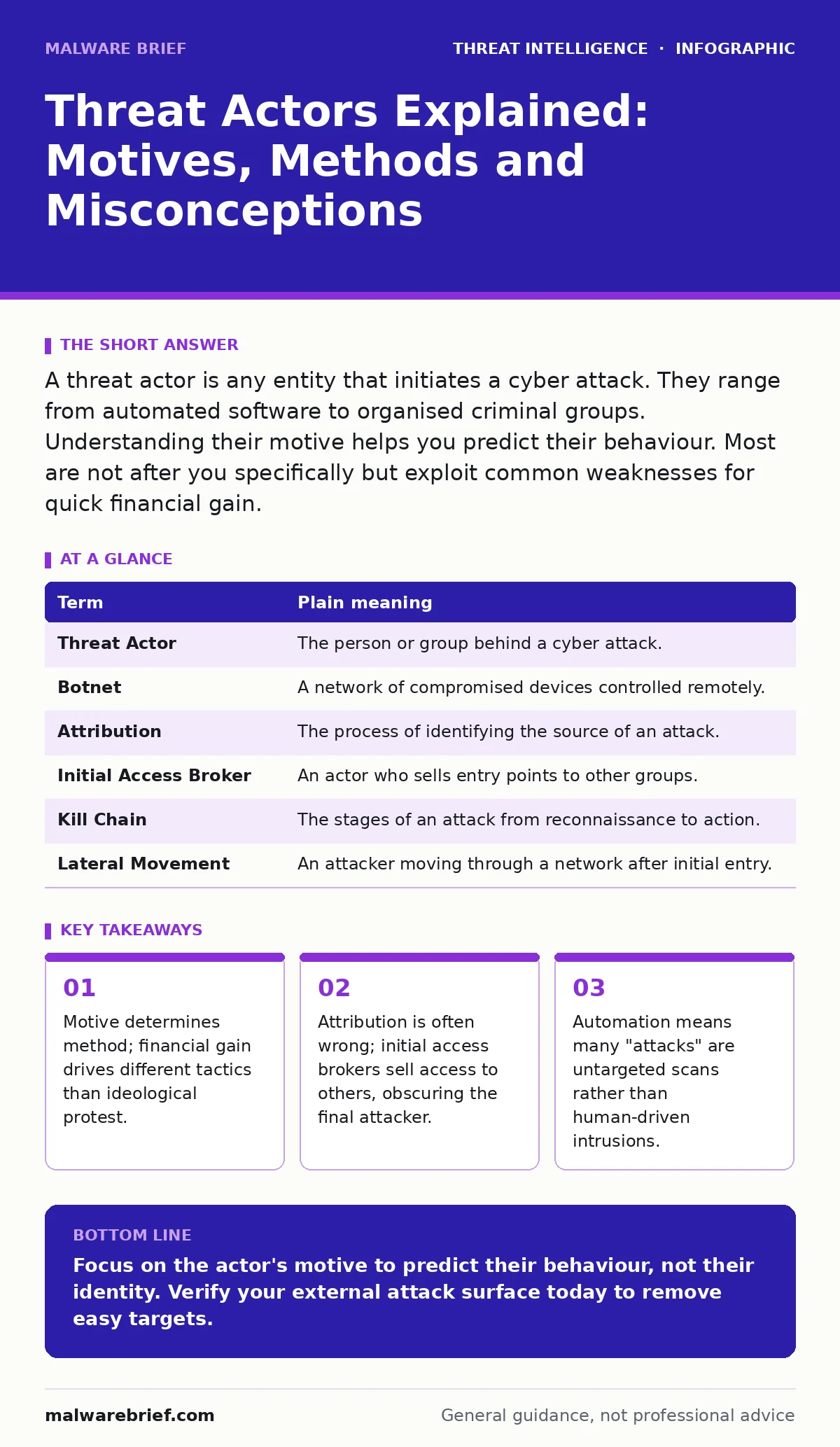
A threat actor is any entity that initiates a cyber attack. They range from automated software to organised criminal groups. Understanding their motive helps you predict their behaviour. Most are not after you specifically but exploit common weaknesses for quick financial gain.
The Burglar Analogy
Imagine a burglar. Some break into houses to steal specific items for a client. Others smash car windows for loose change. Some use sophisticated tools to bypass alarms, while others try the front door. The "threat actor" is simply the person or group behind the wheel. You do not need to know their name to lock your doors. You need to understand what they want and how they usually get it.
This analogy holds because cyber attacks follow similar patterns of opportunity and effort. A script kiddie is like a teenager kicking a ball at a window. A state-sponsored group is like a professional firm hired to steal blueprints. The damage might look similar, but the preparation differs vastly.
Defining the Entity
A threat actor is any individual or group that performs an action to compromise information systems. This term replaces older labels like "hacker" or "cracker" because it is neutral and descriptive. It focuses on the action, not the identity.
Actors fall into broad categories based on motive. Cybercriminals seek financial profit through fraud, ransomware or data theft. Hacktivists pursue political or social goals, often disrupting services to make a statement. Nation-states conduct espionage or sabotage for geopolitical advantage. Insiders are employees or contractors who abuse their legitimate access.
The category matters because it predicts behaviour. A criminal wants money quickly and quietly. A nation-state wants data and will wait years to maintain access. An insider knows the system’s secrets.
The Automation Factor
Many beginners assume every attack involves a human typing commands in a dark room. This is rarely true. Most initial compromises come from automated tools. These scripts scan the internet for known vulnerabilities.
When you see a spike in login attempts, it is likely a botnet. A botnet is a network of infected devices controlled by a single operator. These bots try common username and password combinations against thousands of servers. They are not thinking; they are executing code.
This automation creates a hidden cost for defenders. You must defend against millions of automated probes daily. You cannot block every IP address. You must rely on rate limiting and multi-factor authentication. If you understand this, you stop wasting time investigating every failed login.
Attribution and the Supply Chain
A common point of confusion is believing you know who attacked you. Initial access brokers sell stolen credentials on underground forums. They find the hole; another group exploits it.
This creates a broken chain of attribution. The malware signature might belong to Group A, but the phishing email came from Group B, and the vulnerability was found by Group C. You are often seeing only the last link in the chain.
This is why indicators of compromise can be misleading. An IOCs is a digital artifact, like a file hash or IP address, that signals a compromise. If you only look at the malware, you might misidentify the actor. You must look at the entire kill chain.
Consider credential dumping or pass-the-hash attacks. These techniques steal authentication tokens rather than passwords. If an attacker uses these, they might be trying to hide their origin. The method tells you more about their skill level than their nationality.
Confusion Points for Beginners
Many new analysts confuse the tool with the actor. Using a specific ransomware variant does not mean you were targeted by the creators. Criminals often sell their tools.
Another confusion is scale. Not every attack is a targeted campaign. Most are opportunistic. They exploit bulletproof hosting providers who ignore abuse reports. This allows attackers to host malicious infrastructure cheaply. You are competing against actors who do not care if their servers are shut down tomorrow.
Finally, do not confuse hacktivism with sophisticated espionage. Hacktivists often use defacement or denial-of-service attacks. They want attention. Espionage actors want silence. The noise level is a key differentiator.
See also: IOC Enrichment: Turning Raw Signals into Actionable Context · Pass-the-Hash Attacks: Mechanics, Risks and Mitigation
Practical Detection Steps
You cannot stop every actor, but you can make yourself a poor target. Start by understanding your own attack surface.
- Map your external assets. List every service exposed to the internet. If you do not know it is there, you cannot protect it.
- Implement strict access controls. Use least privilege. Ensure that remote desktop abuse is prevented by disabling direct internet access to remote desktop protocols.
- Monitor for behavioural anomalies. Look for scheduled task abuse or unusual process creation. These are signs of post-exploitation activity.
Mini Glossary
| Term | Plain meaning |
|---|---|
| Threat Actor | The person or group behind a cyber attack. |
| Botnet | A network of compromised devices controlled remotely. |
| Attribution | The process of identifying the source of an attack. |
| Initial Access Broker | An actor who sells entry points to other groups. |
| Kill Chain | The stages of an attack from reconnaissance to action. |
| Lateral Movement | An attacker moving through a network after initial entry. |
Key takeaways
- Motive determines method; financial gain drives different tactics than ideological protest.
- Attribution is often wrong; initial access brokers sell access to others, obscuring the final attacker.
- Automation means many "attacks" are untargeted scans rather than human-driven intrusions.
Focus on the actor's motive to predict their behaviour, not their identity. Verify your external attack surface today to remove easy targets.
Frequently asked questions
How do I know if a threat actor is targeting me specifically?
Look for personalised emails referencing your internal projects or attempts to bypass specific security controls. Random scans are not targeted.
Can I block all threat actors with a firewall?
No. Firewalls block network traffic but cannot stop insider threats or attacks that exploit valid user credentials. You need layered defence.
What is the difference between a red team and a threat actor?
A red team simulates attacks with permission to test defences. A threat actor acts maliciously without consent to cause harm or gain profit.
Should I worry about nation-state actors?
Only if you hold valuable intellectual property or government data. Most small organisations are targets for financial cybercriminals, not espionage.
How this guide was produced: written by the Malware Brief editorial team with AI assistance, checked against the public references listed below, and reviewed when the facts change. See our editorial policy or report an error.